Set where you drive from
Your drives start and end where you drive from: your household's home, or an address of your own.
On this page
Each car leaves from its driver's home, and comes back to it. A driver is the adult who drives, and signs in. Your household is everyone who shares your schedule.
The app calls it Drives from: where someone's drives start and end. Nobody else can set yours.
Before you start: sign in first. An add-on, someone you add who doesn't sign in, never drives. To make someone a driver, invite them.
Open the menu (☰), then tap Household. On a tablet or computer, it's on the left.
Find your name in the household's list. Tap the three dots (⋮) next to it, then Where you drive from.
Settings has it too, beside You drive from.
Live at your household's home? Leave Same address as the household ticked.
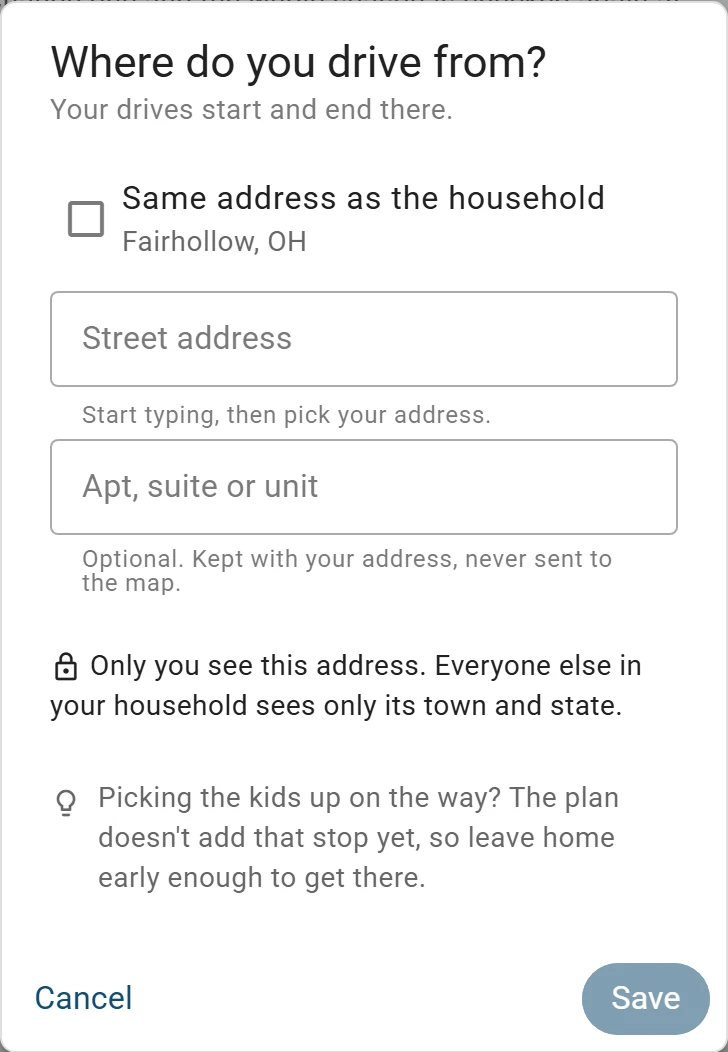
Choose the household’s address, or type one of your own. Drive from somewhere else? Untick it, then type your Street address and pick it from the list.
In an apartment? Type its number in Apt, suite or unit.
Tap Save.
What you'll see
Your row on Household says where you drive from. Until you choose, nobody can hand you a drive.
The household's address
Tick Same address as the household, and you drive from your household's home. Your drive times start there right away.
The Owner, the one person in charge, gets an email and a red dot on the bell. The bell asks Does … live here? and the Owner taps Yes, … lives here. Until then, you see Waiting for … to confirm.
Until then, your phone can't tell when you're at home. If the Owner says you don't live there, the bell and an email ask where you drive from.
Who sees your address
Only you see your own address. The Owner sees your Home base (your shared home address)'s full address, and so do you once they confirm you live there. Everyone else sees only a town and state.
Drive times from your own home, or Home base if you're its Owner or confirmed, aren't rounded. Others round up to 5 minutes, and distances to about 3 miles.
Whose door a car leaves from
A car nobody has taken leaves from your household's home. When only one driver is free, the household's car is theirs, and leaves from their home.
Changing it
You can change your own address up to 3 times a day. If you leave the household, where you drive from is deleted there.
Tip: Picking the kids up on the way? The plan doesn't add that stop yet, so leave home early enough to get there.
What to do next
- Invite your partner or another driverShare one schedule, so everyone you invite sees the same season on their own phone.
- Let someone else drive a gameHand over a game or practice to another adult, and we check each car on its own.
- Let today's plan follow your phoneTurn this on, and today's plan notices if you're still at home or already on the way.
Still stuck?
Write to support@twogamesplus.com and a person will answer.